

As a supplier of Intel OPS Pc, I often receive inquiries from customers about the number of USB ports these devices have. USB ports are essential for connecting various peripheral devices such as keyboards, mice, external hard drives, and flash drives. In this blog post, I will delve into the details of the USB port configurations of different Intel OPS Pc models to help you make an informed decision when choosing the right device for your needs.
Understanding Intel OPS Pc
Before we dive into the USB port details, let's briefly understand what Intel OPS Pc is. Intel OPS (Open Pluggable Specification) Pc is a standardized form factor for PC modules designed to be easily integrated into digital signage displays, interactive kiosks, and other commercial displays. These PCs offer a compact and efficient solution for powering multimedia content and interactive applications. You can find more information about Intel OPS Pc on our website.
USB Port Configurations in Different Intel OPS Pc Models
OPS Windows 10 (1744MXM)
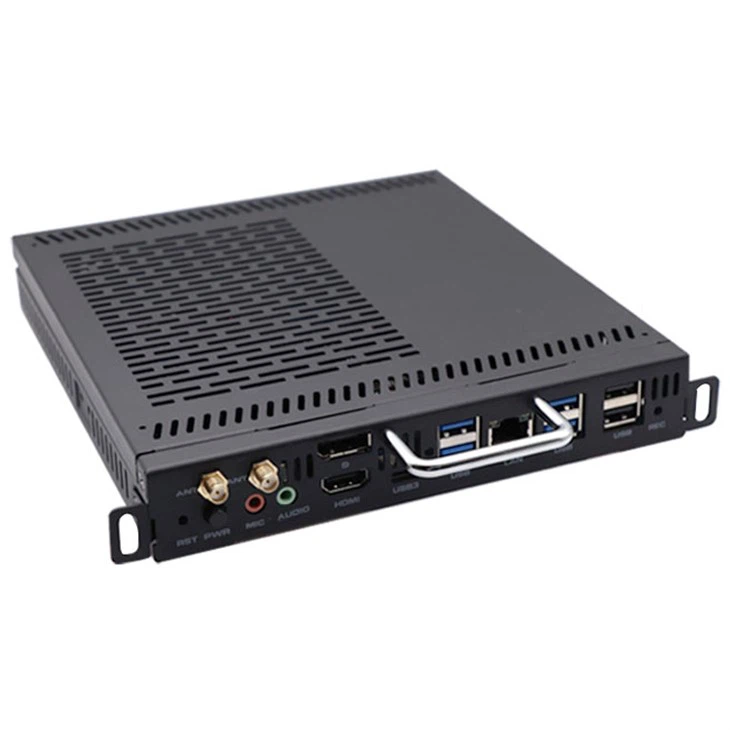
The OPS Windows 10 (1744MXM) is a popular model among our customers. This device comes with a well - thought - out USB port configuration. It typically has a total of 4 USB ports. There are 2 USB 3.0 ports on the front panel, which provide high - speed data transfer capabilities. These ports are very convenient for quickly connecting external devices such as flash drives or mobile devices for data transfer or charging.
On the rear panel, there are another 2 USB 2.0 ports. While USB 2.0 has a slower data transfer rate compared to USB 3.0, it is still suitable for connecting low - speed devices like keyboards and mice. The combination of USB 3.0 and USB 2.0 ports in the OPS Windows 10 (1744MXM) allows users to connect a variety of devices according to their specific requirements.
1744 - IOPS
The 1744 - IOPS model offers a different USB port setup. This model is designed with a focus on providing more connectivity options, especially for users who need to connect multiple peripheral devices. It comes with a total of 6 USB ports.
On the front panel, there are 2 USB 3.0 ports, similar to the OPS Windows 10 (1744MXM). These high - speed ports are great for fast data transfer tasks. On the rear panel, there are 4 USB 2.0 ports. This additional number of USB 2.0 ports on the rear panel makes it easier to connect multiple low - speed devices simultaneously. For example, if you are setting up a digital signage system that requires multiple input devices such as keyboards, mice, and barcode scanners, the 1744 - IOPS can easily accommodate them.
Factors to Consider When Evaluating USB Port Requirements
When choosing an Intel OPS Pc based on the number of USB ports, there are several factors you should take into account.

Type of Peripheral Devices
The type of devices you plan to connect is the most important factor. If you mainly use high - speed data transfer devices like external hard drives or high - resolution cameras, you will need more USB 3.0 ports. On the other hand, if you are using mostly low - speed input devices such as keyboards, mice, and small sensors, USB 2.0 ports will suffice.
Future Expansion
Consider your future needs. If you anticipate adding more peripheral devices in the future, it might be a good idea to choose a model with more USB ports, like the 1744 - IOPS. This will save you the hassle of having to purchase additional USB hubs or upgrade your PC later.
Space and Convenience
The location of the USB ports also matters. Front - panel USB ports are more convenient for quick device connections, while rear - panel ports are often used for devices that are not frequently plugged and unplugged. If you need to access your devices easily, having more front - panel ports can be beneficial.
Conclusion
In conclusion, the number of USB ports in Intel OPS Pc models varies depending on the specific model. The OPS Windows 10 (1744MXM) has 4 USB ports (2 USB 3.0 on the front and 2 USB 2.0 on the rear), while the 1744 - IOPS offers 6 USB ports (2 USB 3.0 on the front and 4 USB 2.0 on the rear). When choosing an Intel OPS Pc, carefully evaluate your USB port requirements based on the type of devices you use, future expansion plans, and convenience factors.
If you are interested in purchasing Intel OPS Pc for your business or project, we are here to assist you. Our team of experts can help you select the right model based on your specific needs. Contact us to start a procurement discussion and find the best solution for your requirements.
References
- Intel OPS Technical Documentation
- Product specifications of OPS Windows 10 (1744MXM) and 1744 - IOPS