
As a supplier of thin ITX systems, I often get asked a variety of questions from customers, and one that comes up quite frequently is, "Can I use a webcam with a thin ITX system?" In this blog post, I'll delve into this topic in detail, exploring the compatibility, potential challenges, and benefits of using a webcam with a thin ITX system.
Compatibility of Webcams with Thin ITX Systems
First and foremost, the good news is that in most cases, you can use a webcam with a thin ITX system. The basic principle of a webcam is to capture video and audio and transmit it to a computer for processing and display. Thin ITX systems, like any other computers, have the necessary interfaces to support webcams.

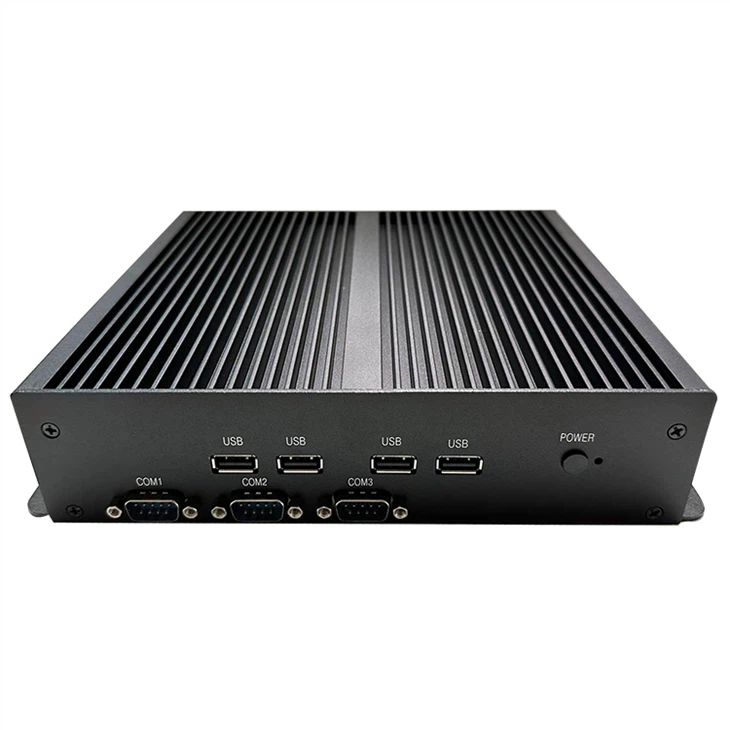
Most modern webcams connect to a computer via a USB port. Thin ITX systems are equipped with USB ports, typically USB 2.0 or USB 3.0, which are compatible with a wide range of webcams. Whether it's a simple plug-and-play webcam for casual video chatting or a high - end webcam for professional video conferencing, as long as it has a USB interface, it can usually be connected to a thin ITX system.
For example, if you have a 11th 12th Thin Itx system, it comes with multiple USB ports that can easily accommodate a webcam. The system's operating system, whether it's Windows, Linux, or macOS, will usually recognize the webcam automatically and install the necessary drivers. Once the drivers are installed, you can start using the webcam for various applications such as video calls on Skype, Zoom, or Microsoft Teams.
Potential Challenges
While the compatibility is generally good, there are some potential challenges that you might encounter when using a webcam with a thin ITX system.
Power Supply
Thin ITX systems are designed to be compact and energy - efficient. Some high - end webcams, especially those with advanced features like high - resolution video capture, built - in microphones, and pan - tilt - zoom capabilities, may require more power than a thin ITX system's USB port can provide. In such cases, the webcam may not function properly, or it may experience intermittent disconnections. To overcome this issue, you can use an external power adapter for the webcam if it's available.
System Resources
Webcams can consume a significant amount of system resources, especially when capturing and processing high - resolution video. Thin ITX systems often have limited processing power and memory compared to larger desktop systems. If you're using a webcam with a high frame rate and high resolution on a J1900 Thin Itx system, which has relatively lower - end hardware specifications, you may notice some lag or stuttering in the video feed. To mitigate this, you can lower the webcam's resolution and frame rate settings to reduce the strain on the system.
Software Compatibility
Although most webcams are designed to be compatible with major operating systems, there may be some software - related issues. For example, some older webcams may not work well with the latest version of an operating system, or there may be compatibility issues between the webcam's drivers and certain video conferencing applications. In such cases, you can try updating the webcam's drivers from the manufacturer's website or using alternative video conferencing software.
Benefits of Using a Webcam with a Thin ITX System
Despite the potential challenges, there are several benefits to using a webcam with a thin ITX system.
Portability
Thin ITX systems are known for their compact size and portability. When combined with a webcam, you can easily set up a mobile video conferencing or streaming station. You can take your thin ITX system and webcam with you to different locations, such as a coffee shop, a client's office, or a conference room, and start video calls or live streaming right away.
Space - Saving
For users with limited desk space, a thin ITX system and a webcam are a great combination. The thin ITX system takes up minimal space on your desk, and a webcam can be easily attached to the top of your monitor or placed on a small stand. This setup allows you to have a functional video - enabled workstation without cluttering your workspace.
Cost - Effective
Thin ITX systems are generally more affordable than traditional desktop computers, and webcams come in a wide range of prices. You can choose a budget - friendly webcam that meets your basic needs, or invest in a high - end webcam for professional use. Overall, using a webcam with a thin ITX system provides a cost - effective solution for video communication and content creation.
Choosing the Right Webcam for Your Thin ITX System
When choosing a webcam for your thin ITX system, there are several factors to consider.
Resolution
The resolution of a webcam determines the quality of the video it captures. For casual video chatting and basic video conferencing, a webcam with a resolution of 720p (1280x720) is usually sufficient. However, if you're using the webcam for professional video conferencing, live streaming, or video recording, you may want to choose a webcam with a higher resolution, such as 1080p (1920x1080) or even 4K (3840x2160).
Frame Rate
The frame rate refers to the number of frames per second (fps) that the webcam can capture. A higher frame rate results in smoother video playback. For most applications, a frame rate of 30 fps is adequate. However, for fast - moving objects or high - energy activities, a frame rate of 60 fps or higher may be preferred.
Field of View
The field of view (FOV) of a webcam determines how much of the scene it can capture. A wider FOV is useful for group video calls or when you want to capture a larger area. Webcams typically have a FOV ranging from 60 degrees to 180 degrees.
Additional Features
Some webcams come with additional features such as autofocus, built - in microphones, and privacy shutters. Autofocus ensures that the subject remains in focus, while a built - in microphone eliminates the need for an external microphone. A privacy shutter allows you to physically block the webcam lens when it's not in use, providing an extra layer of security.
Conclusion
In conclusion, using a webcam with a thin ITX system is not only possible but also offers many benefits. While there may be some potential challenges, such as power supply and system resource issues, these can be easily overcome with the right solutions. As a thin ITX supplier, I recommend choosing a webcam that suits your specific needs and the capabilities of your thin ITX system.
If you're interested in purchasing a thin ITX system or have any questions about using a webcam with it, feel free to contact us for further details and to start a procurement discussion. We're here to help you find the best solution for your video - enabled computing needs.
References
- General knowledge about thin ITX systems and webcams from industry research and product documentation.
- Personal experience as a thin ITX system supplier dealing with customer inquiries and product compatibility issues.