

Can OPS I5 support multiple monitors?
As a supplier of OPS I5 products, I often encounter questions from customers about the capabilities of our devices, especially regarding their support for multiple monitors. In this blog post, I'll delve into the details of whether OPS I5 can support multiple monitors, the benefits of doing so, and how it can enhance various applications.
Understanding OPS I5
First, let's briefly introduce what OPS I5 is. OPS, which stands for Open Pluggable Specification, is a standard developed by Intel for digital signage and other display - related applications. The OPS I5 is a powerful PC module that is based on Intel's Core i5 processors. It offers a balance between performance and cost - effectiveness, making it a popular choice for a wide range of commercial and industrial applications. You can learn more about our OPS I5 on our website.
Can OPS I5 Support Multiple Monitors?
The short answer is yes, OPS I5 can support multiple monitors. The ability to connect multiple monitors depends on several factors, including the graphics capabilities of the Intel Core i5 processor and the available video output ports on the OPS I5 module.
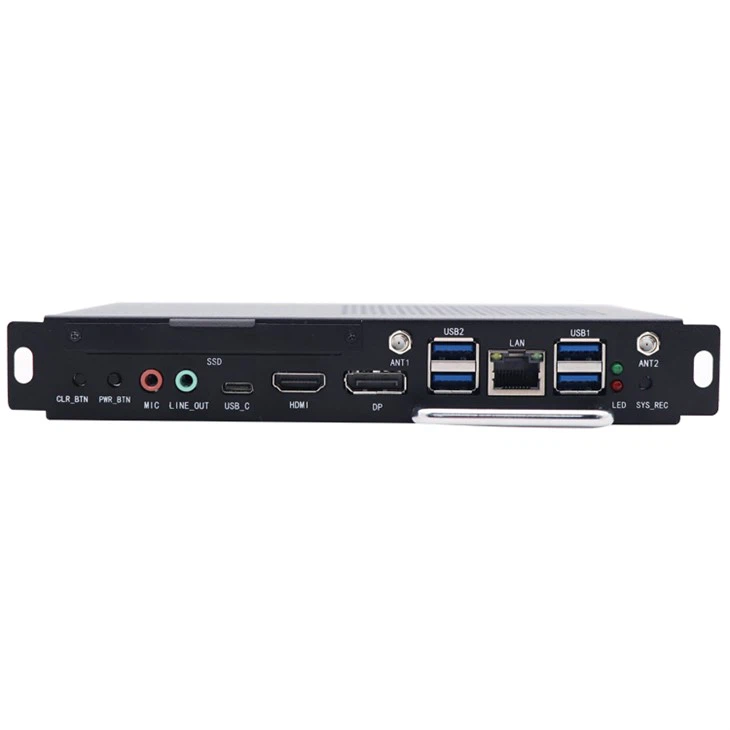
Most OPS I5 modules come with a variety of video output options, such as HDMI, DisplayPort, and VGA. These ports allow you to connect different types of monitors simultaneously. For example, you can connect an HDMI - enabled monitor, a DisplayPort - connected high - resolution display, and a VGA - based legacy monitor all at once.
The graphics processing unit (GPU) integrated into the Intel Core i5 processor also plays a crucial role. Intel's integrated graphics technology has advanced significantly over the years, and modern Core i5 processors can handle multiple display outputs with ease. They support multi - stream output, which means they can drive multiple monitors with different resolutions and refresh rates independently.
Benefits of Using Multiple Monitors with OPS I5
Enhanced Productivity
In a business environment, multiple monitors can greatly enhance productivity. For example, in an office setting, employees can use one monitor for email and communication, another for data analysis or document editing, and a third for reference materials or project management tools. This allows for seamless multitasking and reduces the need to constantly switch between different applications and windows.

Improved Visualization
In industries such as design, engineering, and data analysis, multiple monitors provide a larger and more immersive visual workspace. Designers can have their design software open on one monitor, while having color palettes, reference images, and preview windows on other monitors. Engineers can visualize complex 3D models and simulations on multiple screens, enabling a more detailed and accurate analysis.
Enhanced Digital Signage
In the digital signage industry, multiple monitors connected to an OPS I5 can create a more engaging and dynamic display. For example, in a retail store, you can use multiple monitors to display different product promotions, videos, and real - time inventory information. In a public venue like an airport or a museum, multiple monitors can be used to provide a continuous stream of information and entertainment to the visitors.
Applications of OPS I5 with Multiple Monitors
Corporate Environments
In corporate offices, OPS I5 with multiple monitors can be used for conference rooms, training centers, and executive offices. In a conference room, multiple monitors can be used to display presentation slides, video conferencing feeds, and real - time data analytics. In training centers, instructors can use multiple monitors to demonstrate different aspects of a course simultaneously.
Retail and Hospitality
In the retail and hospitality industries, OPS I5 with multiple monitors can be used for point - of - sale (POS) systems, digital menu boards, and guest information displays. For example, a restaurant can use multiple monitors to display the menu, customer orders, and kitchen status in real - time. A hotel can use multiple monitors in the lobby to display check - in information, local attractions, and weather forecasts.
Education
In educational institutions, OPS I5 with multiple monitors can be used in classrooms, computer labs, and lecture halls. Teachers can use multiple monitors to display teaching materials, interactive educational software, and student feedback. In computer labs, students can use multiple monitors for programming, graphic design, and multimedia projects.
Considerations When Using Multiple Monitors with OPS I5
Resolution and Refresh Rate
When connecting multiple monitors, it's important to consider the resolution and refresh rate of each monitor. Higher - resolution monitors require more graphics processing power, and if you connect too many high - resolution monitors at once, the system may experience performance issues. Similarly, monitors with higher refresh rates, such as 144Hz or 240Hz, also demand more resources from the GPU.
Cable Management
With multiple monitors comes the need for proper cable management. Having a tangle of cables can not only be unsightly but also pose a safety hazard. It's recommended to use cable management solutions, such as cable trays, cable ties, and cable sleeves, to keep the cables organized and out of the way.
Display Configuration
Configuring the multiple monitors correctly is essential for optimal performance. You can use the display settings in the operating system to arrange the monitors in the desired layout, adjust the resolution and orientation of each monitor, and set up extended or duplicated displays.
Our OPS I5 Products for Multiple Monitor Setups
We offer a range of OPS I5 products that are specifically designed to support multiple monitors. Our products are equipped with the latest Intel Core i5 processors and high - quality graphics technology, ensuring smooth and reliable performance when connecting multiple displays.
In addition, we also provide Intel OPS Pc and OPS Windows 10 (1744MXM) options, which are fully compatible with multiple monitor setups. These products come with a variety of video output ports and are pre - configured for easy installation and use.
Contact Us for Procurement
If you're interested in using OPS I5 for multiple monitor setups, we'd love to hear from you. Our team of experts can provide you with detailed information about our products, help you choose the right configuration for your needs, and assist with the procurement process. Whether you're a small business looking to improve productivity or a large - scale enterprise in need of advanced digital signage solutions, we have the products and expertise to meet your requirements.
References
- Intel Corporation. (2023). Intel Core i5 Processors Product Documentation.
- Display Industry Reports. (2023). Trends in Multi - Monitor Usage in Commercial Applications.
- Digital Signage Association. (2023). Best Practices for Using OPS Modules in Digital Signage.